Auto, SOP Authoring & Review
SOPs are the operating guidance your company follows. This page covers where SOPs come from, how a draft becomes a published SOP, and the review controls you use along the way.
In the current product, an SOP can be created two ways: you can upload or write one yourself, or an agent can propose one for you. Either way, a human reviews and publishes it before the company treats it as guidance.
What An SOP Is
An SOP is a piece of operating guidance that teaches the company how you want it to work.
Typical examples:
- playbooks
- internal procedures
- checklists
- brand or process guidance
- operational reference docs
Published SOPs become the operating guidance your agents follow when they do work.
Where SOPs Live
Open the company and go to the SOPs tab.
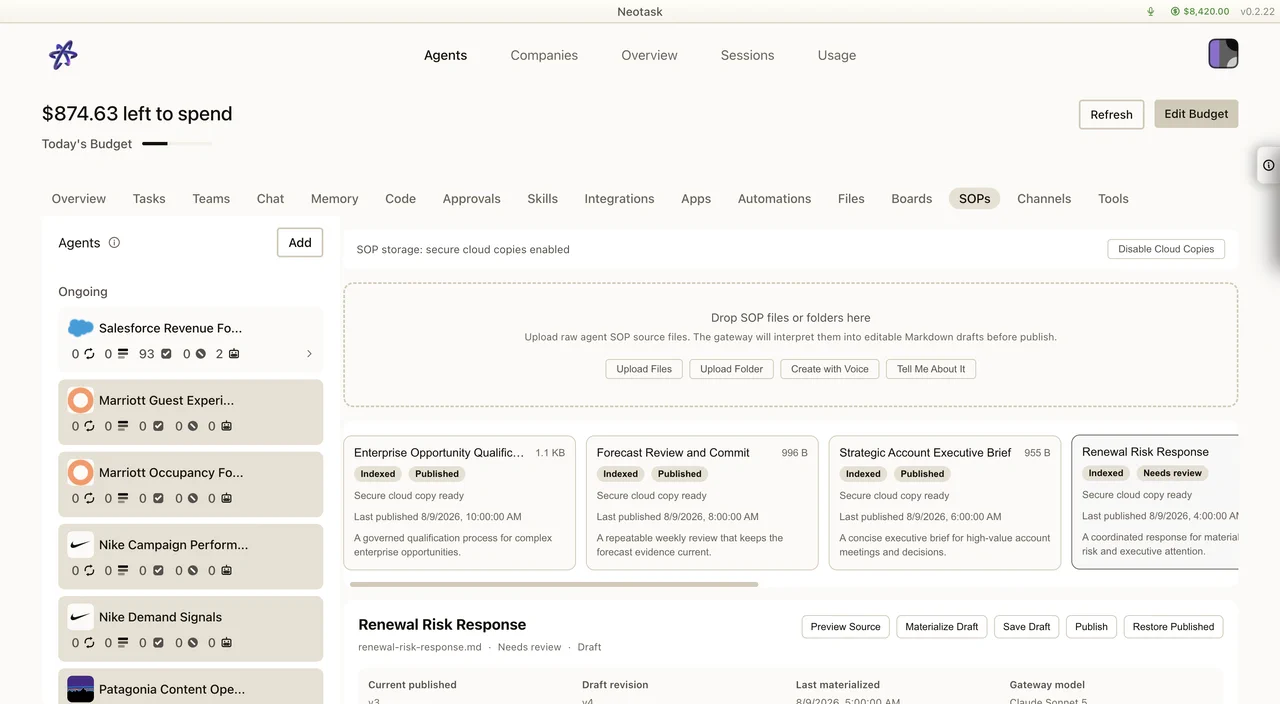
This is the single place to:
- review your published SOPs
- review SOPs an agent has proposed
- create a new SOP yourself
- approve, edit, or discard a pending draft
Who Proposes vs Who Approves
There are two roles in the SOP flow, and they stay separate.
- Agents propose. As your company works and learns, an agent can draft an SOP that captures how a recurring task should be handled and propose it to you. A proposed SOP arrives as a pending draft, it is not active yet.
- A human approves. You always review a pending draft before it counts. Nothing an agent proposes becomes operating guidance until a person publishes it.
This keeps you in control of the company’s playbook. Agents can suggest how the company should operate, but the operating guidance only changes when you say so.
The Review Workflow
When an SOP is waiting for you, open the SOPs tab and review the pending draft.
For each draft you can:
- Approve / publish, accept the draft as written and make it active operating guidance.
- Edit, adjust the wording or content first, then publish your edited version.
- Discard, reject the draft so it does not become guidance.
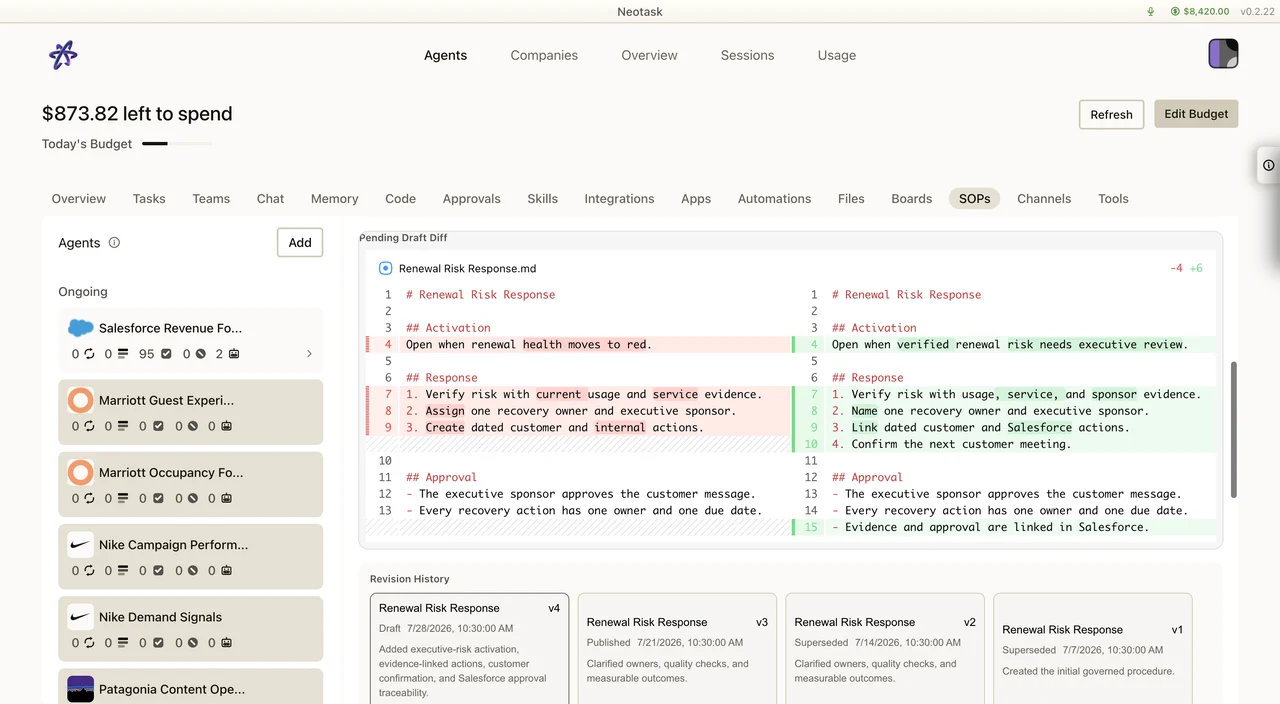
Reviewing changes with a diff
When a draft updates an SOP you already have, the review shows a diff, a side-by-side view of what changed between the current SOP and the proposed version. The diff makes it easy to see exactly what an agent wants to add, remove, or reword before you accept it, so you are never approving a change blind.
A brand-new SOP is reviewed the same way; the diff simply shows it as new content.
Creating An SOP Yourself
You do not have to wait for an agent to propose one. From the SOPs tab you can author your own SOP at any time.
Create with Voice
You can also dictate an SOP by talking. Use Create with Voice (also shown as Tell Me About It) to describe the procedure out loud, and Neotask turns what you say into a drafted SOP. You can keep talking to refine it, then review and publish it like any other draft.
Voice authoring is just another way to get to a draft, once it exists, it goes through the same review and publish step.
Uploaded vs Agent-Authored
SOPs are origin-agnostic. It does not matter whether you uploaded a document, wrote it yourself, dictated it with voice, or an agent proposed it, once it is published, it is treated the same way as company operating guidance.
This means:
- you can build your playbook from your own existing documents
- agents can fill in the gaps by proposing SOPs based on how the company actually works
- everything published lives together in the SOPs tab as one operating guide
What Happens After You Publish
Once an SOP is published, it becomes active operating guidance for the company.
From that point on, your agents draw on it when they do relevant work, the most relevant SOPs are automatically found and attached to an agent’s context when it starts a task. You do not have to point an agent at the right SOP; the company surfaces the guidance that fits the work at hand.
For how that matching works, see Auto, Smart SOP Retrieval.
Quick Decision Rule
- want to add operating guidance yourself → open SOPs and create one (typing or Create with Voice)
- an agent proposed an SOP → open SOPs, review the draft (use the diff if it updates an existing one), then approve, edit, or discard it
- want to know how agents pick which SOPs to follow → see Auto, Smart SOP Retrieval