Security
Review Safety Controls In The App
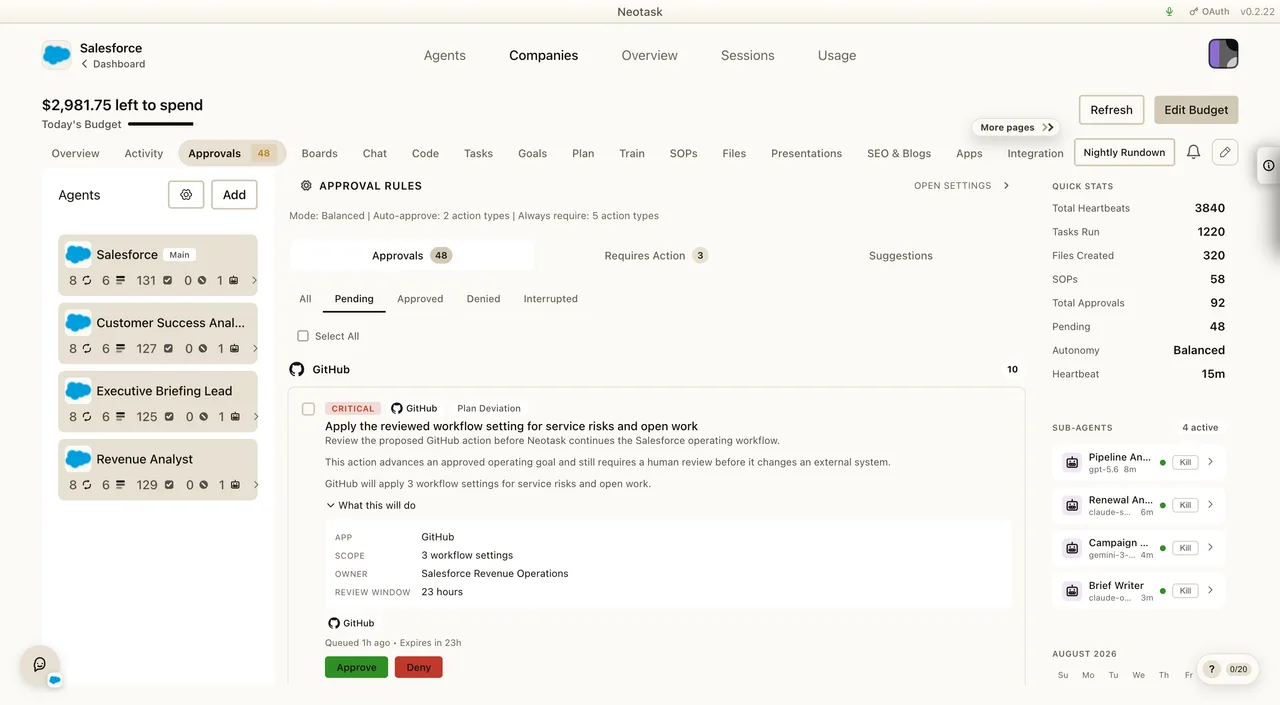
Open Settings → Privacy and Data for data-sharing controls. Open Settings → Permissions for Safe Mode. Open Approvals for actions waiting on a person.

Overview
Neotask is built with security as a core principle. Every layer, from license activation to data storage to network communication, is designed to protect your data and prevent unauthorized access.
License Security
- Device Binding: Each license is cryptographically bound to a single device via SHA-256 fingerprint.
- HMAC-SHA256 Request Signing: All API requests are signed with a per-device secret, nonce, and timestamp.
- Timing-Safe Comparison: All secret comparisons use constant-time algorithms to prevent timing attacks.
- Token Lifecycle: Access and refresh token expiry is controlled server-side via signed JWT claims, enabling instant revocation.
- Automatic Revalidation: Your license is checked every 6 hours.
- Offline Grace Period: 72 hours of offline access before revalidation is required.
- Remote Revocation: Licenses can be revoked server-side instantly.
Two-Factor Authentication (TOTP)
Neotask supports optional (but recommended) two-factor authentication for dashboard access.
- Compatible with Google Authenticator, Authy, 1Password, and any TOTP-compatible app.
- Backup codes are provided during setup. These codes are SHA-256 hashed and are one-time use only.
- TOTP can be enabled or disabled at any time from the Security section in your dashboard settings.
Encryption
Data at Rest
- AES-256-GCM: All tokens, secrets, and API keys are encrypted at rest.
- Machine-Derived Keys: Encryption keys are derived via scrypt from your device identity.
- No Plaintext Storage: Tokens are never stored in plaintext.
Data in Transit
- TLS 1.3: All API communication travels over HTTPS.
- WebSocket Secure (WSS): Real-time gateway communication is encrypted.
- HMAC Signing: Every request includes a nonce and timestamp signature.
Environment Secrets
- Two-Layer Encryption: Build-time environment encryption uses separate keys.
- No Hardcoded Secrets: Zero API keys or tokens exist in source code.
- Log Redaction: Sensitive data is automatically stripped from logs.
Desktop App Security
Electron Hardening
Neotask applies strict Electron security settings to protect the desktop application:
sandbox: true: The renderer process runs in a sandboxed environment.contextIsolation: true: No direct access to the main process from the UI.nodeIntegration: false: No Node.js APIs are exposed to the UI.webSecurity: true: Same-origin policy is enforced.
Content Security Policy (CSP)
default-src 'self': Only resources from the app itself are loaded.script-src 'self': No external scripts are permitted.- Popup windows are blocked.
- Navigation is blocked to prevent redirect attacks.
- Page reload is blocked to prevent state manipulation.
App Integrity
- ASAR Integrity: SHA-256 hash verification of the packaged app.
- Version Attestation: A server-signed manifest with kill switch capability.
- Code Obfuscation: JavaScript obfuscation is applied in production builds.
- Hard Fail Mode: The app blocks entirely on any integrity failure.
Network Security
Gateway Isolation
- The gateway runs on loopback only (127.0.0.1), meaning there is zero external network exposure.
- No incoming connections from outside your machine are accepted.
- Session grants have a 10-minute lifetime, are device-bound, and are HMAC-signed.
3-Strike Lockout
- After 3 consecutive gateway operation failures, all operations are blocked.
- A manual reset is required to restore access.
- This mechanism prevents brute-force attempts.
API Security
Authentication Methods
| Method | Used For | Security Level |
|---|---|---|
| JWT Bearer Token | Web dashboard, API calls | Standard (90-day expiry) |
| License HMAC | Desktop app operations | High (per-device secret) |
| Session Grants | Gateway operations | Very High (10-min, HMAC-signed) |
| TOTP | Dashboard login | Additional factor |
Rate Limiting
| Endpoint | Limit |
|---|---|
| Contact form | 5 requests per 15 minutes |
| Login attempts | 10 requests per 15 minutes |
| Analytics/tracking | 30 requests per 60 seconds |
Input Validation
- All IPC parameters are validated before processing.
- All API inputs are sanitized.
- Protections against SQL injection, XSS, and command injection are in place.
Provider Key Security (BYOK)
When using Bring Your Own Key (BYOK) mode, Neotask applies additional safeguards to your API keys:
- API keys are encrypted with AES-256-GCM before storage.
- Keys are never logged or exposed in error messages.
- Keys are displayed in masked form in the dashboard (only the last 4 characters are visible).
- Secure deletion is performed when a key is removed.
Provider Destination Controls
In hosted-credit mode, Neotask sends model requests only to the official HTTPS hosts assigned to the selected provider. A provider name cannot be paired with an arbitrary target host, and upstream redirects are blocked before they can carry a Neotask-managed or BYOK credential to another destination.
Custom provider base URLs are available only on direct BYOK gateway paths, where the user supplies the destination and credential. They are not accepted by the hosted-credit passthrough.
Safe Mode
The confirmation explains the wider access that becomes available before Safe Mode is disabled.
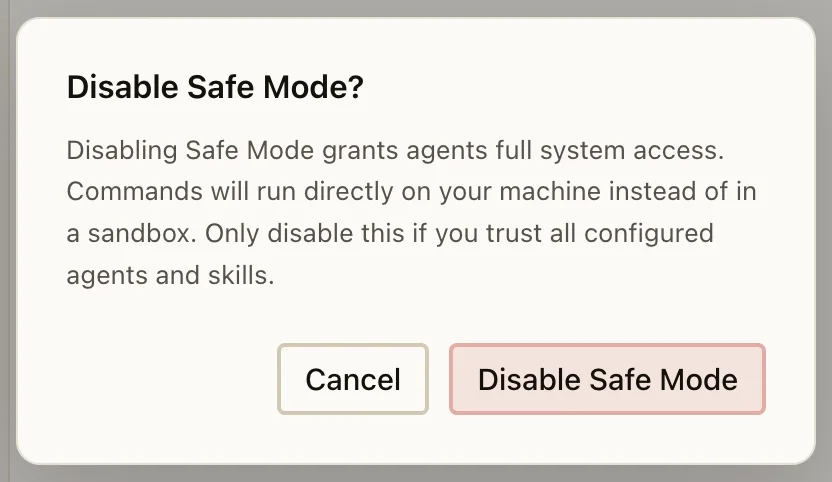
Neotask includes a Safe Mode feature that provides an execution sandbox for agents:
- Per-agent execution sandbox isolates each agent's operations.
- Sensitive operations require explicit user approval before proceeding.
- A master toggle allows you to enable or disable Safe Mode globally.
- Auto-re-enable on schedule ensures Safe Mode is reactivated after temporary changes.
- Real-time policy synchronization keeps settings consistent across all connections.
Audit and Compliance
Approval records show the requested action and the controls available to the reviewer.
- All configuration changes are logged with timestamps.
- Config hashing detects unauthorized modifications.
- Usage telemetry (opt-in) enables anomaly detection.
- CORS is restricted to authorized domains only.
- Helmet security headers are applied on all web responses.
Best Practices
- Enable TOTP on your dashboard for two-factor authentication.
- Download backup codes and store them securely.
- Set daily budgets to prevent unexpected charges.
- Use BYOK mode if you want full control over your API keys.
- Keep the app updated, as auto-updates include security patches.
- Review agent permissions periodically in Safe Mode settings.