Skills
Add Or Review A Skill
- Open Skills.
- Search the catalog or open My skills.
- Review required apps, tools, and configuration.
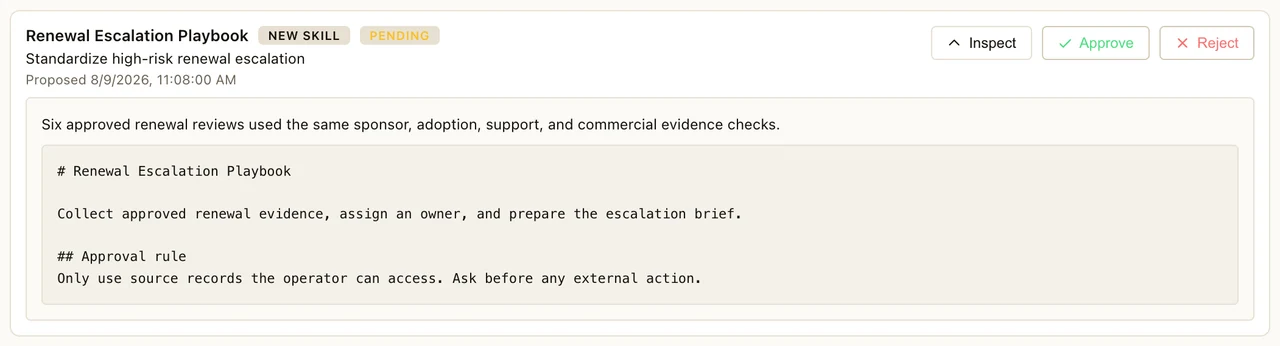
- Open pending review when Neotask proposes a learned skill.
- Approve it only after the source and behavior are correct.
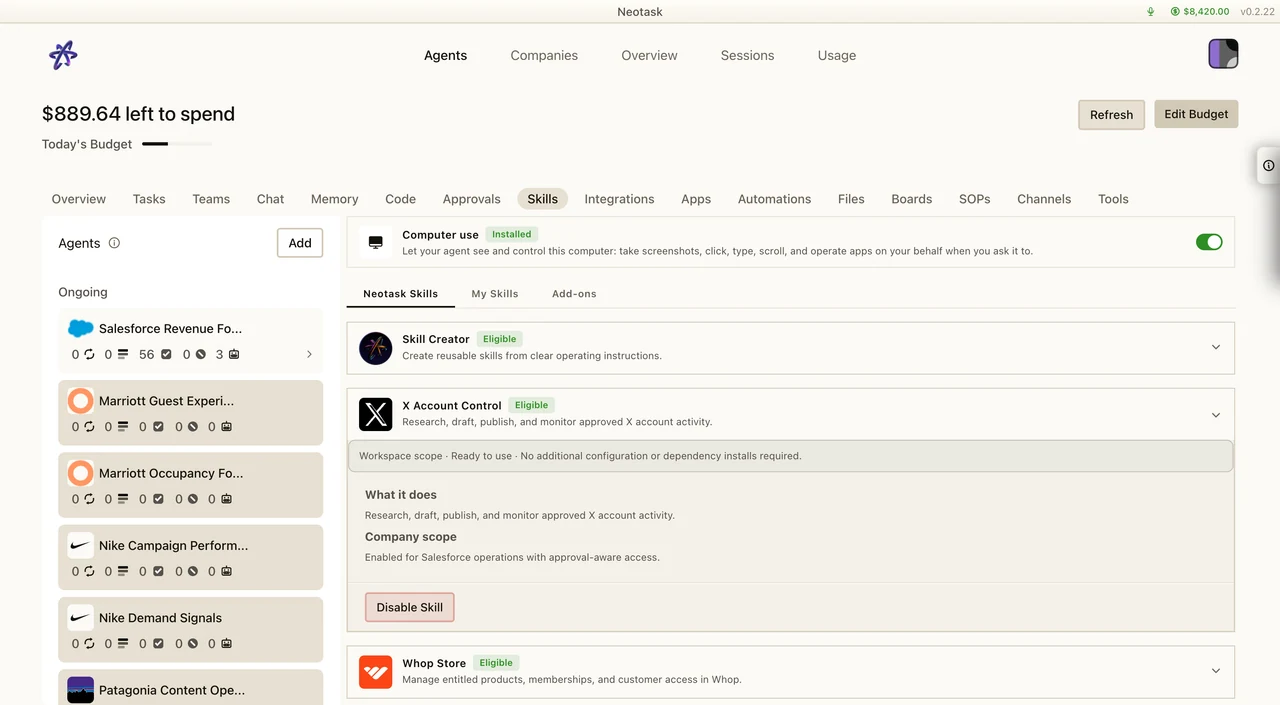
What Are Skills?
Skills are modular capabilities that extend what your Neotask agents can do. Think of them as plugins -- each skill adds a specific ability, from sending emails to controlling smart home devices to running CI/CD pipelines.
Skill Types
| Type | Description |
|---|---|
| Built-in | Always available to every agent. These cover core operations like file management, shell execution, and web requests. No installation required. |
| Marketplace | Installable from the Neotask skill catalog. Browse, install, and configure with a few clicks. |
| Custom | User-authored skills that you write yourself. Define your own logic, API integrations, and workflows. |
Authentication Modes
Each skill declares how it authenticates with external services:
| Auth Mode | Description |
|---|---|
| OAuth | Browser-based authorization flow. You sign in to the third-party service and grant Neotask access. Tokens are managed automatically. |
| API Key | Enter an API key or secret token. The key is stored encrypted and injected at runtime. |
| Local App | The skill connects to an application running on your local machine (e.g., Signal Desktop, iMessage). |
| None | No authentication required. The skill operates without external credentials. |
Skill Categories
Skills are organized into six categories:
Productivity
Tools for managing files, notes, and tasks.
- File management and cloud storage integration
- Note-taking and knowledge base operations
- Task tracking and project management
- Calendar and scheduling
- Spreadsheet and document generation
Messaging
Integrations for email, chat, and SMS platforms.
- Email composition and inbox management
- Chat platform messaging (Slack, Discord, Teams, etc.)
- SMS and MMS sending
- Notification routing and delivery
- Message templating and bulk sends
Media
Processing and generation for images, video, and audio.
- Image resizing, cropping, and format conversion
- Image generation and editing with AI
- Video transcoding and thumbnail extraction
- Audio transcription and text-to-speech
- Screenshot and screen recording capture
Smart Home
Device control and home automation.
- Light, thermostat, and switch control
- Scene and routine activation
- Sensor monitoring and alerts
- Camera snapshot and stream access
- Device status reporting
Developer
Tools for coding, building, and deploying software.
- Code generation, review, and refactoring
- Git operations and repository management
- CI/CD pipeline triggering and monitoring
- Container and deployment management
- Log analysis and error tracking
Data
Analytics, scraping, and data processing.
- Web scraping and content extraction
- Data transformation and cleaning
- Database querying and reporting
- Chart and visualization generation
- CSV, JSON, and XML processing
Installing Skills
Browsing the Catalog
- Navigate to Skills in the dashboard.
- Browse by category or use the search bar to find a specific skill.
- Each skill listing shows its name, description, category, auth mode, and required dependencies.
One-Click Install
- Click Install on the skill you want.
- Neotask performs a dependency check to ensure all prerequisites are met:
- Required system binaries (e.g.,
ffmpeg,chromium) - Required environment variables
- Required companion skills
- Required system binaries (e.g.,
- If all dependencies are satisfied, the skill is installed immediately.
- If dependencies are missing, you will be prompted to resolve them before installation can proceed.
Post-Install Configuration
After installation, you may need to configure the skill:
- API keys -- Enter the required key or token in the skill's settings panel.
- Environment variables -- Set any environment variables the skill needs (e.g., database connection strings, service URLs).
- OAuth connections -- Complete the OAuth authorization flow to grant the skill access to a third-party service.
Enabling Per Agent
Skills are not automatically available to all agents. After installing a skill:
- Open the agent's Settings tab.
- Under Skills, toggle the skill on or off for that agent.
- Only agents with the skill enabled can use it.
This gives you fine-grained control over what each agent can and cannot do.
Skill Configuration
When Neotask proposes a learned skill, review its instructions and permissions before approving it.
API Key Storage
All API keys and secrets are stored encrypted at rest. Keys are decrypted only at runtime when the skill needs them, and they are never exposed in logs, session history, or API responses.
To manage API keys:
- Navigate to Skills and select the installed skill.
- Open the Configuration tab.
- Enter, update, or remove API keys as needed.
Environment Variables
Some skills require environment variables to function. These are set per skill and injected into the skill's execution environment.
- Variables are scoped to the individual skill and do not leak to other skills or agents.
- Common examples include database URLs, service endpoints, and feature flags.
OAuth Connections
For skills that use OAuth authentication:
- Click Connect in the skill's configuration panel.
- You will be redirected to the third-party service to authorize access.
- After authorization, the access token is stored and managed by Neotask.
- Tokens are automatically refreshed when they expire.
- You can disconnect at any time by clicking Disconnect.
Dependency Verification
Each skill declares its dependencies, which may include:
- Required binaries -- System-level programs the skill needs (e.g.,
git,node,ffmpeg). - Required environment variables -- Variables that must be set for the skill to operate.
- Required skills -- Other skills that must be installed first.
Neotask verifies these dependencies at install time and warns you if any are missing. You can also re-check dependencies at any time from the skill's settings.
Built-in Skills
Neotask ships with over 55 built-in skills that are always available without installation. Below is an overview organized by category.
Productivity
| Skill | Description |
|---|---|
| File Manager | Read, write, move, copy, and delete files within agent workspaces |
| Directory Browser | List and navigate directory structures |
| Archive Manager | Create and extract ZIP, TAR, and GZIP archives |
| Clipboard | Copy and paste text between operations |
| Search | Full-text search across workspace files and content |
| Note Taker | Create, organize, and retrieve structured notes |
| Task Tracker | Manage to-do lists with status, priority, and due dates |
| Calendar | Schedule events and set reminders |
Messaging
| Skill | Description |
|---|---|
| Email Sender | Compose and send emails via SMTP or connected providers |
| Email Reader | Read and parse incoming emails from connected inboxes |
| Notification Router | Route alerts and notifications to the appropriate channel |
| Template Engine | Create and apply message templates with variable substitution |
| Bulk Messenger | Send messages to multiple recipients across channels |
Media
| Skill | Description |
|---|---|
| Image Processor | Resize, crop, rotate, and convert image formats |
| Screenshot Capture | Take screenshots of web pages or applications |
| Audio Transcriber | Convert speech to text using AI transcription |
| Text-to-Speech | Generate spoken audio from text |
| Video Thumbnailer | Extract thumbnail frames from video files |
| QR Code Generator | Create QR codes from text, URLs, or data |
Smart Home
| Skill | Description |
|---|---|
| Light Controller | Turn lights on/off, adjust brightness and color |
| Thermostat Manager | Read and set temperature targets |
| Switch Controller | Toggle smart switches and outlets |
| Scene Activator | Trigger pre-defined smart home scenes |
| Sensor Monitor | Read data from temperature, humidity, motion, and door sensors |
| Camera Viewer | Capture snapshots from connected security cameras |
Developer
| Skill | Description |
|---|---|
| Git Operations | Clone, commit, push, pull, branch, and merge repositories |
| Code Formatter | Auto-format code files using language-appropriate formatters |
| Linter | Run static analysis and linting across codebases |
| Test Runner | Execute test suites and report results |
| Dependency Manager | Install, update, and audit project dependencies |
| Docker Manager | Build, run, stop, and manage Docker containers |
| Deploy Trigger | Trigger deployment pipelines on connected CI/CD platforms |
| Log Analyzer | Parse and search application logs for errors and patterns |
| Port Scanner | Check open ports and service availability |
| SSL Checker | Verify SSL certificate status and expiration dates |
Data
| Skill | Description |
|---|---|
| Web Scraper | Extract structured data from web pages |
| CSV Processor | Read, write, filter, and transform CSV files |
| JSON Transformer | Parse, query, and restructure JSON data |
| XML Parser | Read and process XML documents |
| Database Query | Execute SQL queries against connected databases |
| Chart Generator | Create bar, line, pie, and scatter charts from data |
| PDF Reader | Extract text and tables from PDF documents |
| PDF Generator | Create PDF documents from text, HTML, or templates |
| Data Validator | Validate data against schemas and rules |
| Hash Generator | Compute MD5, SHA-256, and other hash digests |
Skill Showcase Pages
Every skill has a dedicated showcase page on the website at neotask.ai/skills/{id}.
These pages provide detailed information about what each skill can do, example prompts, pro tips,
and pricing.
Accessing Skill Pages
- From the landing page: Scroll to the skills carousel section and click any skill card
- Direct URL: Navigate to
neotask.ai/skills/{id}, for example:- Google Workspace: /skills/gog
- Slack: /skills/slack
- GitHub: /skills/github
What Each Showcase Page Contains
- Skill identity: name, category badge, and one-line tagline
- 3 key capability bullets: top features at a glance
- "What You Can Do" section: detailed breakdown of all capabilities organized by sub-feature
- "Try Asking" section: 6-8 example natural language prompts
- "Pro Tips" section: power-user advice
- Pricing comparison: Single Agent ($49/mo) vs Enterprise ($200/mo)
- Related skills: 4 cards linking to similar skills in the same category
Skills on the Landing Page
The landing page at neotask.ai features a skills carousel that scrolls through highlighted skills. Each card in the carousel shows the skill name, tagline, and top 3 capabilities. Clicking any card navigates to that skill's full showcase page.
Complete Skill Directory
Productivity & Workspace (10)
| Skill | Tagline | Page |
|---|---|---|
| Google Workspace | All 21 Google services in one unified skill | View |
| Notion | Search, create, and query your Notion workspace | View |
| Trello | Manage boards, lists, and cards conversationally | View |
| Obsidian | Search, create, and organize your Obsidian vault | View |
| Bear Notes | Create, search, and tag notes in Bear app | View |
| Apple Notes | Read, write, and search Apple Notes hands-free | View |
| Apple Reminders | Create and manage reminders synced to all devices | View |
| Things 3 | Full task management for Things 3 on Mac | View |
| Canvas | Display interactive HTML content on any device | View |
| Summarizer | Summarize articles, PDFs, and YouTube videos instantly | View |
Communication (7)
| Skill | Tagline | Page |
|---|---|---|
| Slack | Send messages and manage channels hands-free | View |
| Discord | Send messages, polls, and reactions in Discord | View |
| iMessage | Send and read iMessages directly from conversation | View |
| BlueBubbles | Full iMessage control with effects and reactions | View |
| Send WhatsApp messages and files to anyone | View | |
| Email (IMAP) | Read, compose, and manage email from any provider | View |
| Voice Calls | Make and manage voice calls programmatically | View |
Media & Creative (12)
| Skill | Tagline | Page |
|---|---|---|
| Video Creator | Batch-render videos with parallel processing and upload | View |
| Video Frames | Extract frames from any video at precise timestamps | View |
| AI Image Gen | Generate and batch-create images with multiple AI models | View |
| Music Recognition | Visualize audio with spectrograms and analysis tools | View |
| GIF Search | Search, preview, and download GIFs from Tenor and Giphy | View |
| Screenshot | Control your Mac screen, windows, and UI elements | View |
| Camera | Capture snapshots and video from network cameras | View |
| Spotify | Control Spotify playback and search from conversation | View |
| Sonos | Control Sonos speakers and multi-room audio | View |
| Text-to-Speech | Generate speech completely offline with zero API costs | View |
| Banana AI | Generate and edit images with Gemini 3 Pro | View |
Development & DevOps (10)
| Skill | Tagline | Page |
|---|---|---|
| GitHub | Manage repos, PRs, and code from conversation | View |
| GitHub Issues | Auto-fix GitHub issues with parallel AI agents | View |
| Coding Agent | Delegate coding tasks to Codex, Claude, or Pi | View |
| Skill Creator | Build custom skills without writing any code | View |
| MCP Porter | Connect and call any MCP server from one interface | View |
| Terminal Multiplexer | Monitor and control tmux sessions remotely | View |
| Session Logs | Search past conversations and track token costs | View |
| Health Check | Audit and harden your system security posture | View |
| Blog Watcher | Track RSS feeds and get notified of new posts | View |
AI Models (5)
| Skill | Tagline | Page |
|---|---|---|
| Gemini | Quick one-shot queries to Google Gemini models | View |
| Oracle | Bundle files and prompts to query any AI model | View |
| Speech-to-Text | Transcribe audio locally with zero API costs | View |
| Whisper API | Fast cloud transcription via OpenAI Whisper API | View |
| Model Usage | Track AI model costs and token usage over time | View |
Utilities & Smart Home (9)
| Skill | Tagline | Page |
|---|---|---|
| 1Password | Access secrets and passwords without leaving your workflow | View |
| Weather | Get current weather and forecasts for any location | View |
| Google Places | Search nearby places with ratings and reviews | View |
| Food Ordering | Browse order history and reorder favorite meals | View |
| Order CLI | Manage food delivery orders from the command line | View |
| PDF Tools | Edit PDF content using plain English instructions | View |
| System Agent | High-quality text-to-speech with expressive voices | View |
| Bluetooth | Control Bluesound and NAD speakers over your network | View |
| 8sleep Control | Control your Eight Sleep pod temperature and alarms | View |
| Philips Hue | Control lights, colors, and scenes in every room | View |
Google Workspace Sub-Skill Pages
The Google Workspace skill (gog) also has 21 individual sub-skill pages, one for each Google service. These provide focused documentation for each service within the suite:
| Sub-Skill | Service | Page |
|---|---|---|
| Gmail | Email management | View |
| Calendar | Event scheduling | View |
| Drive | File storage | View |
| Docs | Document editing | View |
| Sheets | Spreadsheets | View |
| Slides | Presentations | View |
| Forms | Form creation | View |
| Keep | Quick notes | View |
| Tasks | Task management | View |
| Contacts | Contact management | View |
| Chat | Team messaging | View |
| Meet | Video meetings | View |
| YouTube | Video platform | View |
| Photos | Photo storage | View |
| Places | Location search | View |
| Routes | Directions | View |
| Business | Business profiles | View |
| Classroom | Education | View |
| Play | App store | View |
| AdSense | Ad revenue | View |
| Ads | Advertising | View |
Multi-Language Support
Skill showcase pages are currently available in English only. Multi-language support for skill pages is planned for a future update.