Nightly Rundown
Review Tomorrow's Work
- Open Nightly Rundown from the company workspace.
- Review completed work, unresolved items, and suggested tasks.
- Approve or edit work that requires a person.
- Open Plan to see the resulting schedule.
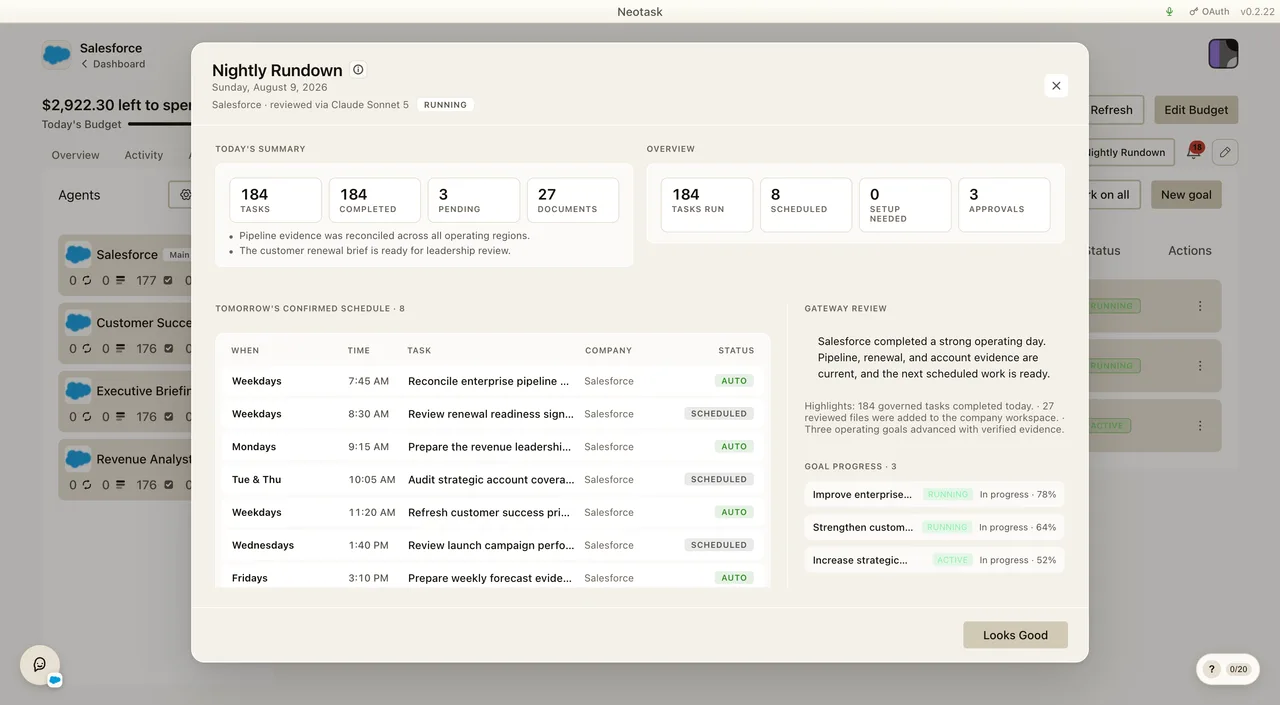
The Nightly Rundown is your company's autonomous end-of-day engine. Every night it runs on its own, reviews everything your company did, actively checks your live tools and tomorrow's readiness, plans and (when you allow it) schedules the next day's work, then delivers the whole briefing to you by email and in your chosen channel, with one place to approve anything extra it found.
It's not just a summary screen you open. It's a per-company job that fires on a schedule, thinks about tomorrow, turns its best ideas into real tasks (capped and gated to your comfort level), and even assigns you the steps only a human can do, so your company keeps moving overnight and you wake up to a clear, actionable plan.
Note: The Nightly Rundown is part of a feature rollout and is controlled by a per-company setting, so it may not be switched on for every company yet. Everything below describes how it behaves when it's enabled.
How It Works at a Glance
- It runs itself, nightly. Each company gets its own nightly schedule (default 10:00 PM in the company's local time, configurable). The job fires on that schedule every night, including weekends, without you opening anything and without slowing down your company's other work.
- It reviews today + inspects your live tools. It gathers your real last-24-hours activity and runs a read-only AI review that actively probes your connected apps, payments, email, and integration health to catch fresh signals.
- It plans tomorrow. A mini planner turns the review's findings into a capped set of real next-day tasks, sequenced around your fixed plan and your company's mode.
- It respects your autonomy level. On autopilot it auto-approves up to your nightly cap and schedules the work; in supervised mode it queues those tasks as proposals for you to approve.
- It assigns you the human steps. When something genuinely needs a person, connect an app, upload a file, give feedback, ship a physical item, it creates a task for you that holds the dependent agent work until you've done it.
- It delivers + saves. It saves the rundown to your account (the database is the source of truth), emails you the briefing, and can post it, with interactive approve/deny buttons, into a connected Slack, Teams, or Discord channel.
- It's instant when you open it. Opening the Nightly Rundown shows the already-generated briefing immediately, no waiting, no errors.
When It Runs
The Nightly Rundown runs on a dedicated per-company nightly schedule, by default 10:00 PM in the company's local timezone, and you can change the time (see Turning It On & Setting the Time).
- On its own schedule, every night. A real scheduled job fires nightly in your company's local time. It runs even on quiet days and weekends, so your company keeps up with support email, payments, light content, and product work.
- Spread across the fleet. Nightly jobs are deterministically staggered across the window (and naturally spread across each company's local timezone), so nothing piles up at the same instant.
- Off the hot path. The heavy review + planning runs in the background, separate from your company's normal task loop, a long nightly run never delays your scheduled tasks.
- Instant on open. Clicking the Nightly Rundown button on the company dashboard opens that night's already-generated briefing immediately. If a rundown hasn't been generated yet, you see the day's summary plus a "generating" state while it's prepared, never a "not ready" error and never a failed screen.
- Once per day. The rundown is built once per upcoming business day. Reopening it shows the same review for tomorrow rather than regenerating, and a retry for the same day never duplicates tasks or re-sends your email.
What It Reviews
Before it shows you anything, the Nightly Rundown gathers your company's real activity, it never invents a summary. The end-of-day digest reads the last 24 hours; the planner additionally considers a configurable lookback window (see Lookback Window below) so its recommendations are grounded in the right amount of history.
| It looks at | So it can show you |
|---|---|
| Tasks that ran (from your authoritative task-run history) | How many tasks succeeded and how many failed |
| Files & documents created | What your company actually produced today |
| Approvals processed + items still waiting | What's been decided and what still needs you |
| Requires-action items | Anything blocking a task until you act |
| Today's activity & errors | Highlights worth knowing and problems to look at |
| Your live schedule (real scheduled jobs) | Exactly what is set to run tomorrow |
| Connected vs. disconnected integrations | Apps that are broken or expired and could stall tomorrow's work |
| Your active plan | The fixed work tomorrow is built around |
| Billing context | Today's task-fee spend, your credit balance, and any tasks blocked for balance |
Every billing read is safeguarded, if it can't be loaded, the rundown still shows everything else rather than failing.
Active Live-Tool Inspection
Beyond reading your stored activity, the nightly review actively inspects your live tools each night, read-only, it looks at things like Gmail, your payments/Stripe state, your connected MCP apps, and overall integration health to surface fresh signals (a customer email that needs a reply, a payment that needs attention, an integration that quietly expired). These probes are strictly read-only, the review can look, but it never sends, charges, or changes anything on its own. If a probe fails (for example, a disconnected integration), that becomes a visible integration-health finding in your rundown rather than being silently dropped.
Lookback Window
You choose how much history the nightly planner weighs when it reasons about tomorrow:
| Preset | Roughly how far back | Best for |
|---|---|---|
| Daily | ~3 days | Fast-moving companies that want tight, recent-focused planning |
| Weekly (default) | ~2 weeks | The balanced default, enough context without over-reaching |
| Monthly | ~1 month | Slower cycles where monthly patterns matter |
| Quarterly | ~1 quarter | Big-picture, longer-horizon reasoning |
The window is always bounded, so even a quarterly lookback stays fast and never dumps unbounded history. The day's summary is always the last 24 hours, the lookback only widens what the planner considers.
The Next-Day Planner
Open Tasks after the planner finishes to review the resulting work and the reason each task was added, continued, changed, or dropped.
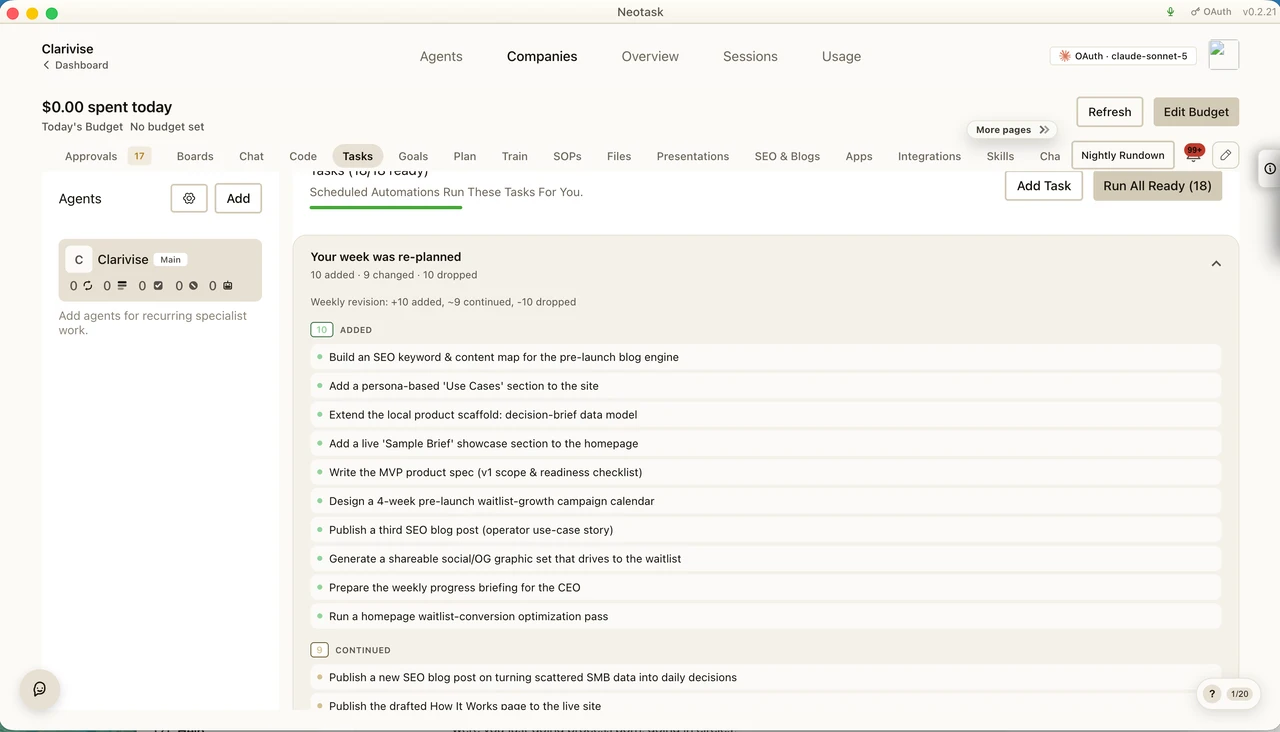
This is what makes the Nightly Rundown an engine rather than a digest. After the review, a mini planner proposes net-new work worth doing that isn't already in your fixed plan, and, when you allow it, turns those proposals into real next-day tasks that are scheduled to run tomorrow.
- Capped on purpose. It creates at most your maximum dynamic tasks per night (default 3, adjustable). If the review surfaces more ideas than the cap, it keeps the highest-priority ones. Each task costs roughly a normal task run, so the cap keeps spend predictable (≈$3/night at the default).
- Mode-aware. A build-mode company's next-day tasks lean toward building toward revenue; a manage-mode company's lean toward operations. Work that isn't ready yet (for example, selling before the product is ready) is held behind its prerequisites instead of firing prematurely.
- Budget-aware & idempotent. It respects your budget, and a re-run for the same day reconciles to the same set, it never double-creates tomorrow's tasks.
This replaces the old behavior where suggestions were only recommendations that never became work.
How Generated Tasks Are Gated (Your Autonomy Level)
The next-day tasks follow the same autonomy tier and approval system the rest of your company uses, there's no separate, parallel approval path:
- Autopilot / full-autonomy company: the nightly tasks (up to your cap) are auto-approved and scheduled to run tomorrow.
- Supervised / balanced company: each nightly task becomes a pending proposal in your approvals queue. Nothing runs until you approve it, and approvals never expire, so nothing is lost if you wait.
You stay in control of the comfort level; the nightly engine simply plugs into it.
Tasks the AI Assigns to You (Human-Gated Work)
Some essential steps can only be done by a person, connecting an account, uploading a deliverable or file, giving a decision/feedback, or a real-world action like shipping a physical item. The Nightly Rundown can detect when a human is genuinely required and create a task for you, then hold the dependent agent work behind it until you've completed it, even in full autopilot.
- The human step shows up as a clear to-do (connect / provide / confirm / do).
- The downstream agent task that depends on it won't run until you finish the human step.
- Completing your step releases the dependent agent task on the next cycle.
This way the AI never silently stalls or pretends a blocked-on-you task is done, it asks you for exactly what it needs and keeps everything else moving. (This shares the same human-task system the weekly planner uses, so your human to-dos live in one place.)
Delivery: Email + Your Channel
When the rundown is generated and saved, it reaches you two ways:
- The morning email. Saving the rundown triggers a single owner email, your end-of-day/morning briefing, sent once per night for that day (a retry won't double-send). It uses your existing email path; no new third party is involved.
- Interactive channel delivery. If you've pointed the rundown at a connected channel (Slack, Microsoft Teams, or Discord), it posts the briefing there with interactive Approve / Deny / Always-Approve buttons on each proposed task. You can:
- Route by channel or by user, send the rundown (and its approvals) to a shared channel or directly to a specific person.
- Control who can approve, a per-user permission check means only authorized people can act on the buttons; an unauthorized press is refused.
- Approve right from the message, a button press resolves the underlying approval through the normal approval system; Always-Approve turns a recurring yes into a standing rule so you stop being asked.
Everything stays consistent: the email, the channel message, and the in-app modal show the same plan and the same approvals.
What You See in the App
Opening the Nightly Rundown shows a single, unified next-day plan with clear sections:
- Today's Summary, Tasks, Failed, Pending, and Documents counts, plus highlight chips (e.g. "12 tasks completed," "3 files created," "$0.42 in task fees") and watch-out chips (e.g. "2 tasks failed or blocked," "1 action item needs attention").
- Overview, Tasks Run, Scheduled, Setup Needed, and Approvals at a glance.
- Tomorrow's Plan & Readiness, one combined list of everything set to run tomorrow: your fixed scheduled tasks, the new dynamic tasks the planner created, and any human-gated tasks (shown as blocked-on-you), each with a color-coded readiness label. Click any row to jump straight to that task.
- Requires Your Action, tasks paused until you do something (connect an app, upload a file, make a decision).
- Pending Approvals, approve or deny each one, or Approve All / Deny All at once. Approvals never expire.
- Gateway Review, the AI's written summary of the day, with Highlights and Watchouts.
- Suggested Tomorrow Work, cards for extra ideas surfaced outside your fixed plan (see below).
- Looks Good, dismiss the rundown when you're done.
The header shows the date, the company name, and which AI model produced the review.
Tomorrow's Readiness Labels
Each task set to run tomorrow gets a label so you know, at a glance, whether it will just run or wait for you:
| Label | What it means |
|---|---|
| Auto | Runs without asking. The company (or this task) is set to auto-approve, or the task is low-risk enough to run on its own. |
| Scheduled | Will run as planned, no approval needed. |
| Likely Approval | Will probably ask for your OK first, the company is in a supervised mode, or the task is higher-risk or set to always require approval. |
| Pending Approval | An approval is already waiting for this task right now. |
| Blocked on You | A human step must be completed first (connect / upload / decide / do) before the dependent task can run. |
| Ready / Setup Needed / Blocked | Runtime states, ready to go, needs an app connected first, or currently blocked. |
These labels are derived from your real autonomy settings, live approval records, and human-task gating, so they reflect what will actually happen, not a guess.
Suggested Tomorrow Work
Alongside the tasks it schedules, the review also surfaces ideas as cards, recommendations that explain why they're worth doing, how likely they are to need approval, and which screen to open to act on them. Suggestions come in seven kinds:
| Type | What it suggests |
|---|---|
| Plan gap | Useful work your fixed plan missed |
| Follow-up | A natural next step to something that already happened |
| Integration fix | A disconnected or broken app to reconnect before it blocks tomorrow's work |
| Analysis | A one-off analytical or diagnostic task |
| Content opportunity | A content or SEO opportunity to capitalize on |
| Approval follow-up | A recurring approval pattern that could become a standing rule |
| Risk review | A prompt to investigate failed, blocked, or error events |
Each carries a priority (low / medium / high) and an approval likelihood (none / maybe / likely) so you can triage fast.
How It's Generated
The Nightly Rundown is produced by a real, read-only AI review running on Neotask's gateway, on the nightly schedule. The review can inspect your live tools, connected apps, and activity, but it never changes anything or runs a task on its own, only the planner (gated by your autonomy level) schedules work. It returns a structured summary, highlights, watchouts, and a prioritized set of suggested-tomorrow-work items, and it self-corrects if its first draft comes back malformed.
The review uses whichever AI model your company is set to use. Failure is always visible, never silent: if a review comes back empty or unusable, the engine reports it and leaves your last good rundown intact, it never overwrites a working briefing with an empty one. Each rundown is saved to your account (the database is the source of truth), so it's consistent across devices and kept as a record.
Turning It On & Setting the Time
The Nightly Rundown is configured in Notification Preferences for each company:
- Nightly Rundown toggle, turns the nightly engine on or off for the company.
- Time, when it runs each night (default 10:00 PM, company-local).
- Timezone, the timezone the schedule fires in (defaults to the company's profile timezone).
- Max dynamic tasks per night, the cap on next-day tasks the planner may create (default 3).
- Lookback preset, Daily / Weekly (default) / Monthly / Quarterly.
- Review depth, how actively the nightly review probes your live tools.
- Channel delivery, which connected channel (and which users) the rundown and its approvals are sent to, plus who's allowed to approve.
"Receive a nightly summary of all activity, tasks run, and pending items, and let Neotask plan and tee up tomorrow's work."
Every setting is saved to your account (the database is the source of truth), so it follows you to any device. When the engine is off, no nightly job runs and nothing is scheduled, though you can still open the Nightly Rundown button on demand.
Related
- Approvals & Safety, how approvals, autonomy modes, and risk levels decide what runs on its own
- Planning & Weekly Updates, the fixed weekly plan the nightly engine checks readiness against and complements
- Company Modes, build vs. manage, which shapes the next-day plan
- Agent Spending, task fees, budgets, and the per-night cap
- Channels, connecting Slack, Teams, or Discord for interactive delivery
- Company Dashboard, where the Nightly Rundown button lives