Skill Learning
Skill Learning lets an autonomous company's agent turn its own successful work into a reusable capability. When the agent completes a task in a new way that works, it can propose a skill describing how to do it again. Once that skill is live, every future run for that company can use it, so the agent keeps getting better at your specific business over time.
What Skill Learning Is
A learned skill is a small, self-contained procedure the agent writes for itself after finishing real work, in the same format as a normal skill (a SKILL.md file with a description and instructions). Skills can come from the agent noticing a repeatable pattern at the end of a task, from a scheduled review of past work, or from a weekly cleanup pass (see below). Every proposal goes through an automated content check before it can ever be applied, so a learned skill can never smuggle in credentials or unsafe instructions.
Learned skills are scoped to a single company. They are not shared between companies and do not change what a different company's agent can do.
Turning Skill Learning On or Off
Open your company's Settings, then go to Skill Learning under the Autonomy section. The Learn new skills toggle controls whether the agent is allowed to propose new skills from its work.
- On by default. Every company starts with skill learning enabled.
- Turning it off pauses new proposals only. Skills that are already live keep working. Disabling the toggle stops the agent from writing new ones; it does not remove what it already learned.
How Approval Works
Whether a proposed skill needs your sign-off depends on the company's autonomy tier, set in the Approvals section of the same settings area:
| Autonomy tier | What happens to a new proposal |
|---|---|
| Supervised | Requires your approval before it goes live. |
| Balanced | Requires your approval before it goes live. |
| Autopilot | Applies automatically and appears in the activity feed. |
Under Supervised or Balanced, a proposed skill sits as a pending item until you approve or reject it. It never expires or times out on its own. Under Autopilot, the agent writes the skill immediately without waiting on you, but the write is never silent: it is recorded as an auditable event so you can see exactly what was added and when.
Changing the company's autonomy tier updates this behavior automatically; you don't need to do anything else in the Skill Learning section for the new tier to take effect.
Reviewing Pending Skills
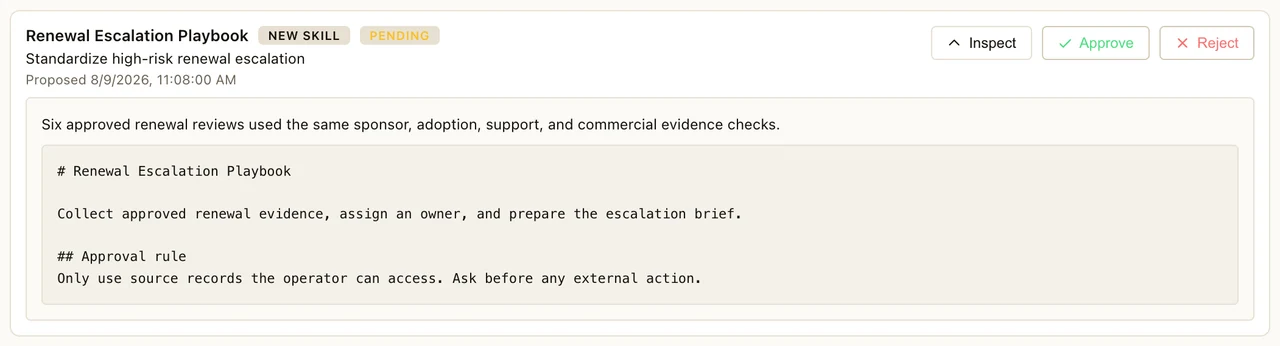
The Pending skills card, shown right on the Skill Learning settings page, is where you review skills waiting on a decision. For each one you'll see:
- The skill's name and a chip describing what kind of change it is (new skill, addition, or revision to an existing one).
- A status chip: Pending, Applied, Rejected, or Quarantined.
- A short title, the agent's stated reason for proposing it, and when it was proposed.
Click Inspect to expand a proposal and see the reason in full along with the exact content that would be written if you approve it. From there, Approve makes the skill live for the agent; Reject discards the proposal. Both actions ask for a quick confirmation first. If nothing is waiting on you, the card simply says there is nothing to review.
A Quarantined status means the automated content check flagged something in the proposal. Quarantined items can be inspected but cannot be approved or rejected from this card, since they were never allowed to reach the pending state in the normal path.
The card refreshes automatically in the background, and you can also refresh it manually at any time.
Weekly Skill Consolidation
Once a week, Neotask can review a company's learned skills and merge ones that overlap into a single, cleaner skill, in addition to retiring skills that have gone stale. This keeps the skill set from growing cluttered as the agent learns more over time. Nothing is ever deleted outright. Retired skills are archived and remain recoverable rather than removed.
This runs on its own cadence in the background (no more than once a week, and only once a company has learned enough skills for consolidation to be worthwhile) as part of skill learning, and only while skill learning itself is turned on.
To opt out, go to Skill Learning in company settings and turn off Weekly skill consolidation. This toggle is separate from the main Learn new skills toggle. Turning off consolidation still lets the agent propose new skills; it just stops the periodic merge/cleanup pass. Like the main toggle, it is on by default, and it is grayed out (not available to change) whenever skill learning as a whole is off, since there would be nothing to consolidate.
Durability: Skills Survive a Reinstall
Learned skills are not just a local file on your machine. Every time a skill is applied or its status changes, Neotask saves the full record to your company's account on our servers. That durable, per-company copy is the source of truth, not the local copy on disk. The local copy is only a working cache.
Practically, this means if you reinstall the desktop app, reset your machine, or move to a new device, your company's learned skills come back automatically once you sign back in. They are rebuilt from the server-side copy, not lost with the old install.